This post shows how to search for a keyword from your Blogger Dashboard, and then how to apply a label to all of the posts you find. You can follow the steps to apply a new(-er) label to old(-er) posts, as well as to correct the spelling or capitalization of existing labels.
The keyword in this example is a label that I had used only once; it was on a recent post. I noticed the label in the sidebar earlier today, "paragraphs (1)," and decided to use it on more posts.
Here's how:
- To find all of the posts in which you use a keyword, type it into the search field under the Edit Posts tab in your dashboard, click on the search button, and check for results.
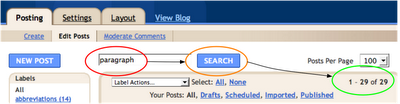
In this case, I found 29 posts containing the keyword, "paragraph" (singular). I was
almost ready for label actions, which appear when you open the drop-down menu with a click on the small black triangle.

Possible actions include applying existing labels, such as "abbreviations" (above), adding new labels, and removing old ones.
- The next step is to select the posts to which you want to apply label actions.
Since I was fairly certain that I wanted to add a particular label to all of the posts found in my Edit Posts search (Dashboard [illustrated above]), I selected them all. Another way you can select posts is to tick the boxes to the left of individual posts in your dashboard list.
- After selecting posts (all or some), you scroll down the list of Label Actions and existing labels to find the action (and label) that you want to apply.
I chose to apply (add) the label, "paragraphs" (plural) to all of the posts that I'd found.

The results appeared in a caption above the search field.
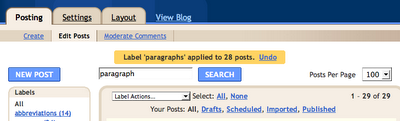
Note: Blogger added labels only to 28 of the 29 posts [that] I'd found in a search of all posts (drafts, scheduled, imported, and published). The 29th post that I'd found already had the label I was applying.
- If you want to change existing labels, the process is similar:
- Click on the label that you want to change in the Labels sidebar (Dashboard: Edit Posts).
- This works like the search of all posts (Dashboard: Edit Posts: Search), but looks only for existing labels on them.
- Select ALL of the posts with the label that you want to change.
- Scroll through Label Actions, and apply a different or new label.
- If you want to correct your *spellling or *CaPiTaLiZaTiOn of existing labels:
- Add correctly spelled and capitalized labels first.
- Then remove incorrectly spelled or capitalized labels.
- BEWARE: If you remove inaccurate labels before you apply accurate ones, it may be[-come] extremely difficult to find all of the posts again, especially if you have labeled them with words or phrases such as "essays" or "essay prep." that don't appear in the posts themselves.
[489 words {+ 3, 2008.12.11}]